The Monday inbox test: how to stop answering the same ten buying questions every week.
Open your inbox on a Monday morning and count how many messages are questions you have already answered before. Most of them are pre-sales questions: things people want to know before they buy, like shipping, sizing or returns. For many owners and small support teams these repeats quietly eat a realistic five to ten hours every week, spread across email, WhatsApp, chat and evenings. Here is the workflow that gets those hours back.
Start with the Monday inbox test
The test takes two minutes. Look at everything that came in since Friday evening and sort it into two piles: questions you are answering for the first time, and questions you have typed some version of before. Shipping times, sizing, compatibility, returns, "is this right for my situation". If the second pile is bigger, you have quietly become a manual answering machine, one keystroke at a time.
No single message is the problem. Each one takes three minutes and feels like good service. The damage is in the sum: the same ten to twenty questions, slightly rephrased, arriving through every channel you have, at every hour. Each one interrupts whatever you were actually building. And answering faster will not fix it. The repeat questions have to stop arriving as work in the first place. Six steps get you there.
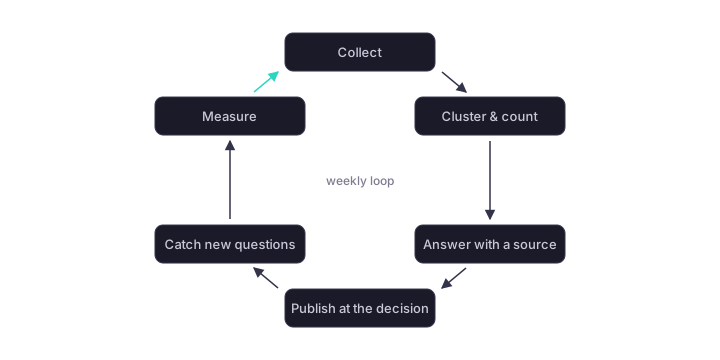
Step 1: Collect every buying question for one week
For one normal week, write down every pre-sales question that reaches you, word for word where you can. Pull from the inbox, the chat log, WhatsApp, and jot down what people ask on the phone. Do not filter, do not tidy the phrasing, do not skip the ones that feel too obvious. The obvious ones are usually the highest-volume ones.
The verbatim wording matters more than it looks. Customers do not ask "what is the product's ingress protection rating". They ask "can I leave this outside in the rain". Your published answers will work best when they speak the second language, and this week of collecting is where you capture it.
Step 2: Group and count. The top 20 carry the volume
At the end of the week, group the questions that mean the same thing and count each group. Each group is a cluster, if you want the technical word for it. The shape of the result looks remarkably similar across shops and industries: a short head of frequent questions carries most of the volume, and the top 20 clusters almost always cover the large majority of what arrives. What remains is a pile of questions that each showed up once or twice. That pile is fine. It stays human.
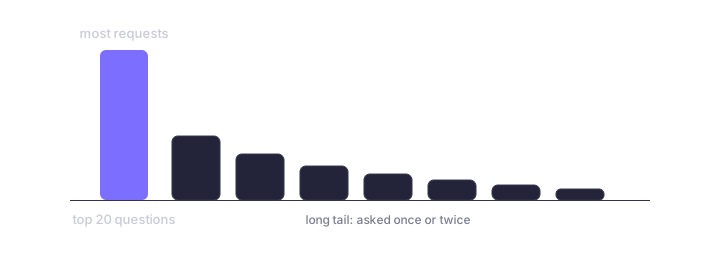
Sort the list by count and draw a line under the top 20. That list is your work order. Everything below the line, ignore for now. This step exists to give you permission to skip most of the list without feeling sloppy about it.
Step 3: Answer each one properly, once, with a source
Now write the answer you wish you had time to write at 9 p.m. on a Tuesday. One per cluster. Complete, honest about limitations, in the customer's wording from step 1. And anchor every answer in your own material: the product data, the spec sheet, the policy document it comes from. The source is what makes the answer maintainable. When the policy changes next year, you know exactly which answers are affected.
This unit of question plus answer plus source is the core of the whole method. We call that structure a BIQ, short for business-identifying question: a question whose answer decides whether someone buys from you. In Klariton, the Buying Answers workflow adds a review step on top, which simply means a person approves every answer before it goes live. Tool aside, the principle stands: an answer with no source attached will quietly go stale, and you will find out from an annoyed customer.
Step 4: Put the answers where the decision happens
Here is where most FAQ projects die. The answers get written, then buried on a page called FAQ that nobody visits at the moment of doubt. A customer wondering about sizing is on the product page. A customer worried about returns is at the checkout. If the answer is not visible at that spot, they do one of two things: write to you, which recreates the inbox problem, or leave, which is worse.
So place the answers where the decision happens: on the product page, in a small answer box embedded right there (a widget), in the checkout flow. A central FAQ page can still exist as an archive. Think of it as the warehouse, not the shop window.
Step 5: Catch new questions before they scatter
The first 20 answers are a snapshot. New products, new seasons and new types of customers generate new questions. If those land back in your inbox as loose mail, the machine you just built rusts within months. The fix is structural: every question your published answers cannot handle gets captured automatically, in one single list, instead of scattering across postboxes and chat histories.
That list becomes a weekly five-minute routine. Look at what came in, spot the new cluster forming, write one new answer, done. In Klariton, unanswered customer questions collect exactly like this and wait for your review. This collect-answer-repeat loop is what turns a one-time cleanup into a system, whatever tool you end up using for it.
Step 6: Measure what the answers actually do
Finally, check whether the work works. Two numbers tell the story: which answers get read, and which answers precede a purchase or a contact. An answer nobody opens is either placed wrong or answering a question nobody asked. An answer that keeps appearing right before orders is doing sales work and deserves a better spot. And the Monday inbox test itself remains your bluntest measuring stick: the repeat pile should visibly shrink within a few weeks.
The bonus: the same answers work inside AI assistants
Here is the part that makes the effort pay twice. When someone asks ChatGPT or Perplexity, the AI search engine, a buying question in your category, the assistant looks for material it can quote safely: clearly structured questions with answers that rest on a source. That is exactly what you just built. An assistant struggles to lift a hard fact out of a generic marketing page. Out of a clean question-and-answer unit, it is easy.
Your inbox work doubles as what people call AI visibility: whether assistants can find you, quote you and recommend you. If you want to know how that plays out for businesses your size, read whether AI visibility is worth it for small and mid-size brands.
What stays with you, honestly
This workflow only removes the repetitive share. Special cases, custom requests, price negotiations and customers who want to feel a person on the other end still belong to you, and handing those to automation would cost more than it saves. The same honesty applies to the answers themselves. When no verified answer exists, a good system says so and hands the conversation to a human (support people call this escalating) instead of guessing. How you enforce that, with review gates and regular checks that answers still match your data, is covered in our piece on how to stop an AI assistant from making things up.
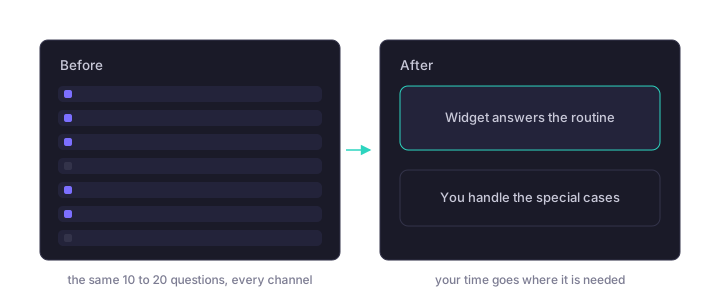
What changes is the ratio. The hours stop going into retyping the same ten answers and start going into the conversations that actually need you.
Frequently asked questions
Ask your question about Klariton.
Grounded in Klariton’s own knowledge, cited rather than invented.
Klariton is an Answer Engine Optimization platform. It adds to your existing shop or website without replacing anything or migrating data. Your own knowledge becomes verified, source-based answers (BIQs) that AI assistants and your visitors use directly.
Product copy, FAQs, spec sheets, your CMS or shop catalog. Klariton processes your material read-only and turns it into cited answers. Your data is never used for model training.
All AI calls run EU-hosted. Personal data is pseudonymized before every call. Klariton reads your sources read-only and stores no plain-text customer data.
Every answer is source-backed and passes a review gate. Nothing is published unchecked. Safe Guard continuously watches published answers against your material and flags outdated or weak claims.
No. Klariton integrates with your existing site, with no platform switch or migration. One embed is enough, and your CMS stays the source of truth.
Plans scale with touchpoints and answer volume. The AI visibility check is free and needs no sign-up. For everything else, just talk to us.
How visible is your brand to AI?
The free AI visibility check shows you in under a minute how AI assistants see your shop today.